Turn on automatic updates and downloads
Creation date: 6/10/2020 12:52 PM
Updated: 6/10/2020 12:52 PM
To Ensure you are always using the latest version of the streamline mobile app,
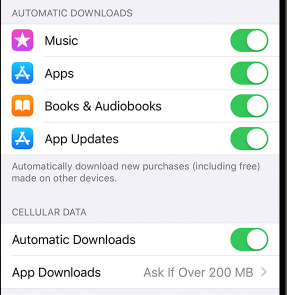
To turn on Automatic updates
On your iPhone, iPad, or iPod touch, go to Settings > [your name] > iTunes & App Store. Then turn on or turn off App Updates.
To turn on Automatic Downloads
On your iPhone, iPad, or iPod touch, go to Settings > [your name] > iTunes & App Store. Under Automatic Downloads, turn on or turn off Apps.
make sure Cellular data Automatic downloads is also turned on, if you Device is Equipped with a Cellular data connection.
DataImage2.png